Agent & terminal ready
An embedded Model Context Protocol server. Drive validations, inspect mappings and query diffs from Claude Code or a local agent, under the same privacy modes.
Local-first Workday data validation for consultants. Line up any two extracts by key, see exactly what changed, what’s missing, and why — and hand the client a sign-off report they trust. Yours on this project and the next.
Zero install · the live demo runs in your browser with sample data
Windows 10 & 11 14-day full trial Runs entirely on your machine
The extracts you already get emailed on a project.
Query endpoints and databases directly. Skip manual exports.
4 years. 4,600+ commits. 1,900+ in the last 12 months.
Built and maintained by a Workday conversion lead who still runs it on every go-live.
No sign-up. Nothing to install. A real streamed session of the app with sample data, discarded when you close it. Pick a walkthrough.
Open a saved employee validation, run it, and read the results: the match overview, every difference with both values, and one worker traced cell by cell. Then drop in your own CSVs.
Start from two files with mismatched headers and no key. Watch AI pair the columns, find the identifier, run the comparison, and explain what differs in plain language. AI is included in the session.
The demo streams the desktop app. Open this page on a computer to launch it.
A comparison is a series of questions: are these the same rows, what changed, where, and is it a data problem or a mapping problem? Each screen answers one of them.
One row per target column, the source column beside it, matched by name automatically. Mark the key, switch off the columns you don't care about, and the whole setup is saved as a validation you reload next cycle.
X ↔ X_REFERENCE automatically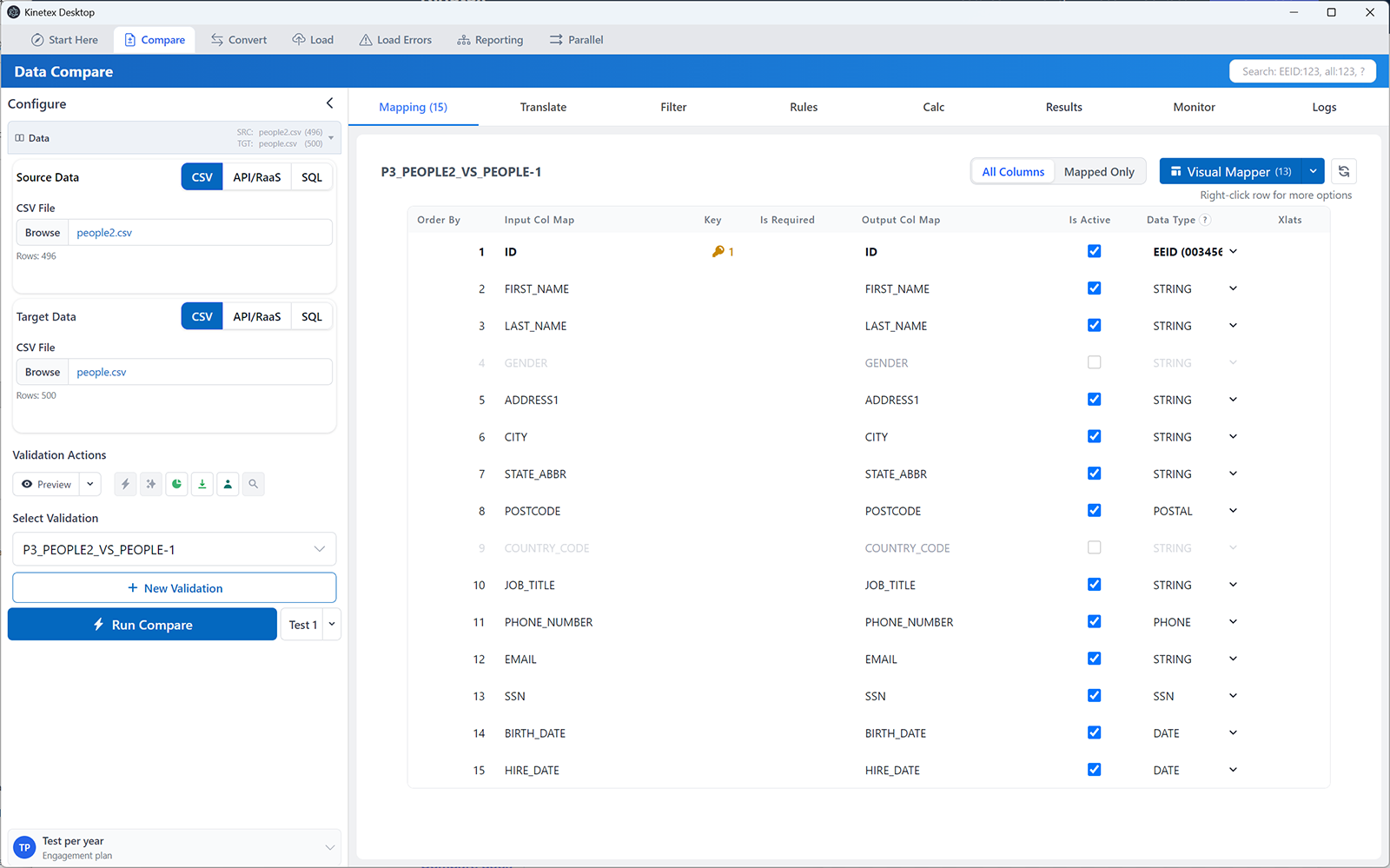
Run 1, 100 or 1,000 rows taken from both ends of the file, ordered by key, where the newest hires sit. No report is written, and it finishes in seconds on a 450,000-row workbook, so you find the mapping mistake before the full run, not after.
How Test differs from Run →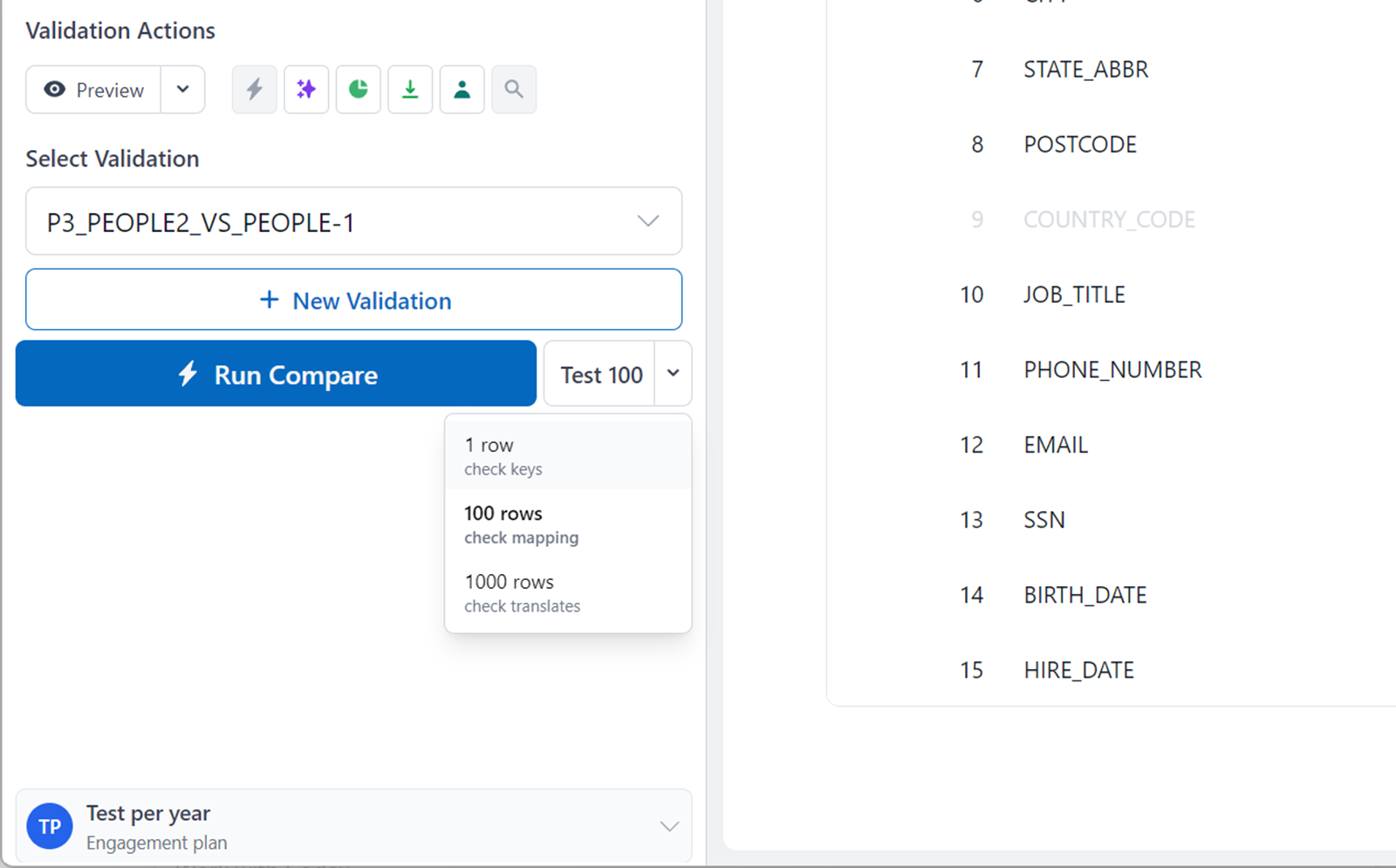
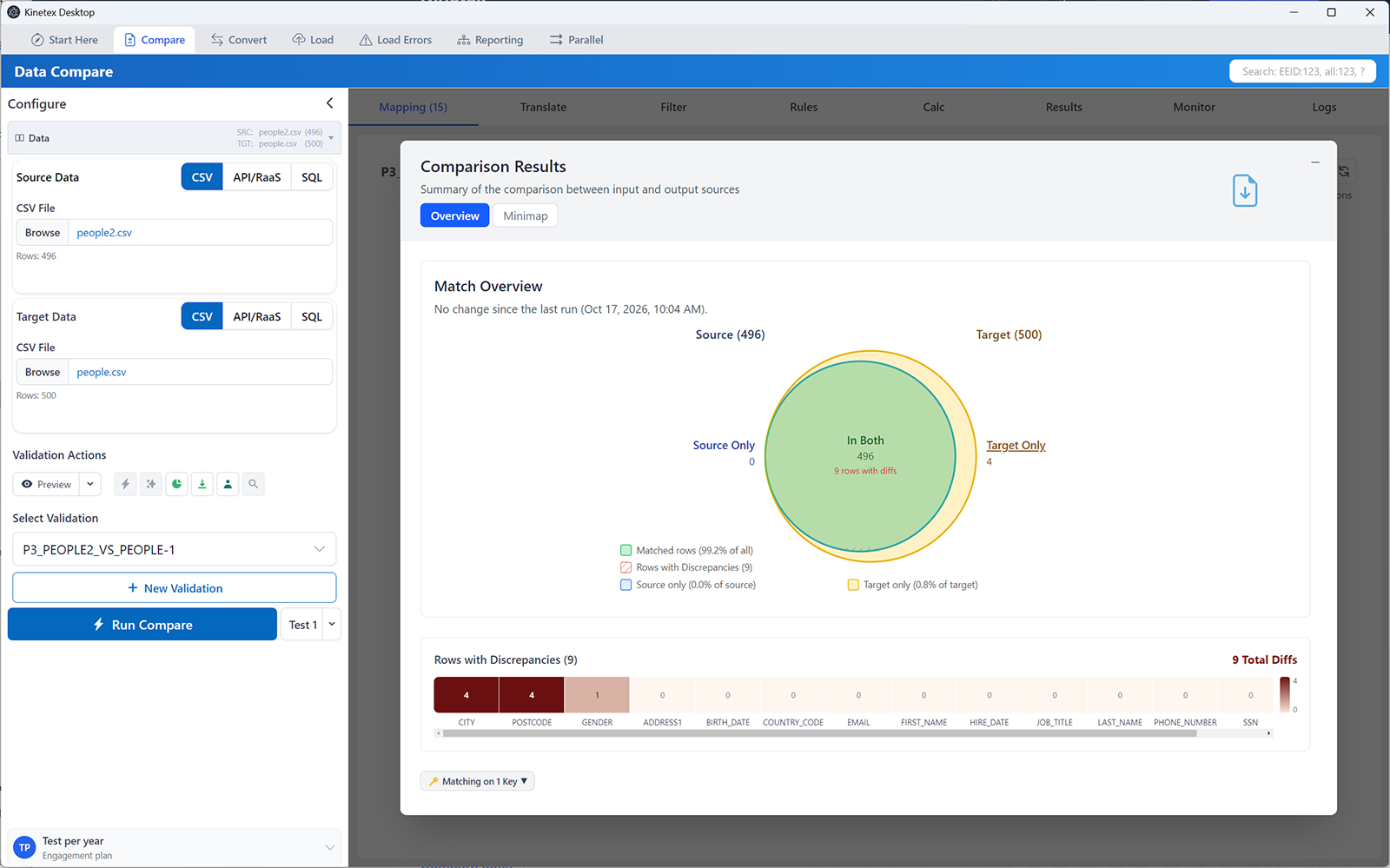
Matched, differing, only-in-source and only-in-target, per column, as a heatmap. A column that is entirely red is a translation or mapping problem, not a thousand data problems, and you can see that before opening a single row.
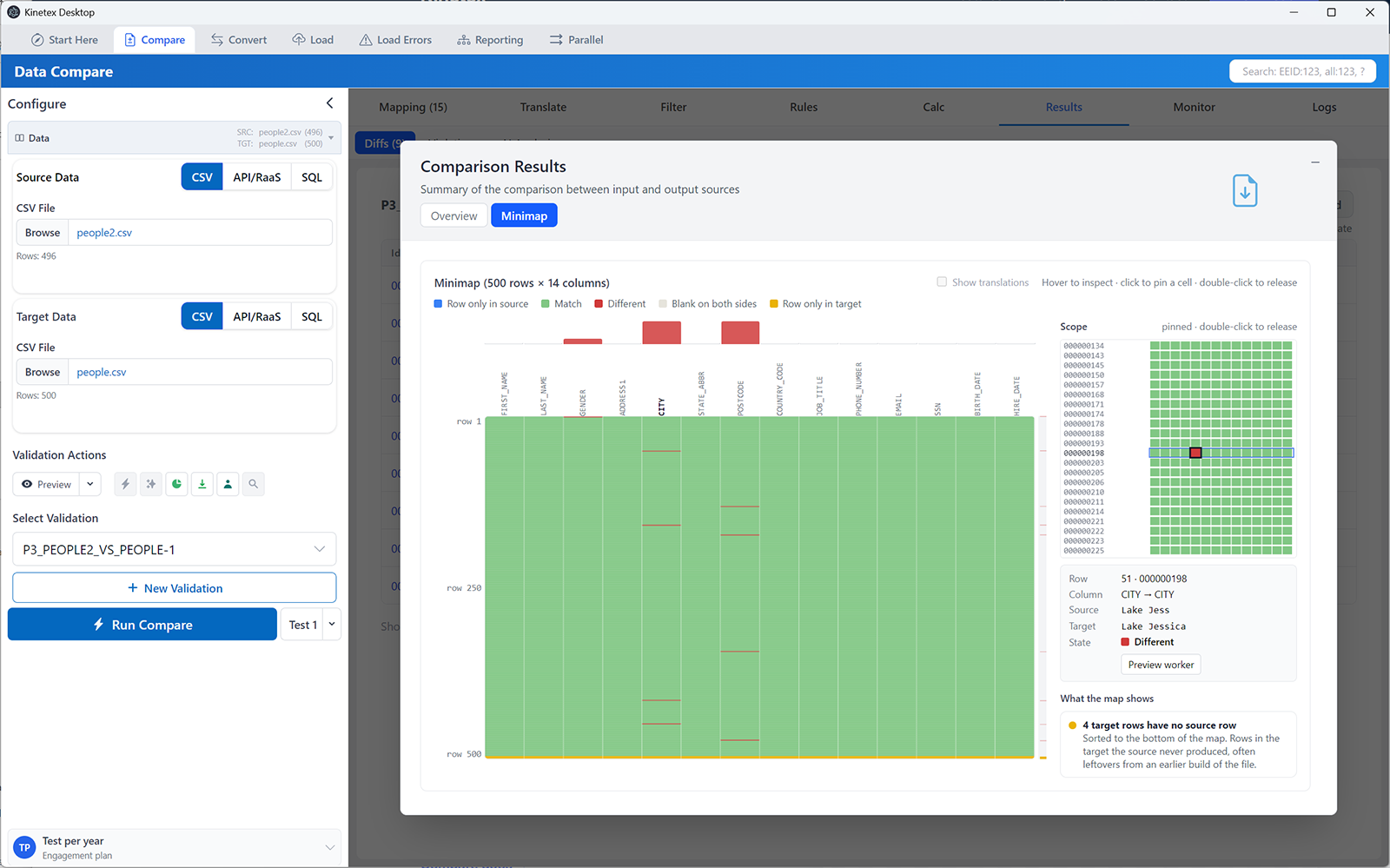
One pixel per column and row, coloured by outcome. Patterns jump out that a grid hides: a solid column is a crosswalk gap, a horizontal band is one batch, a diagonal is a key offset, scattered dots are free-text drift. Click a callout and the map outlines the region; click the region and you're looking at those rows.
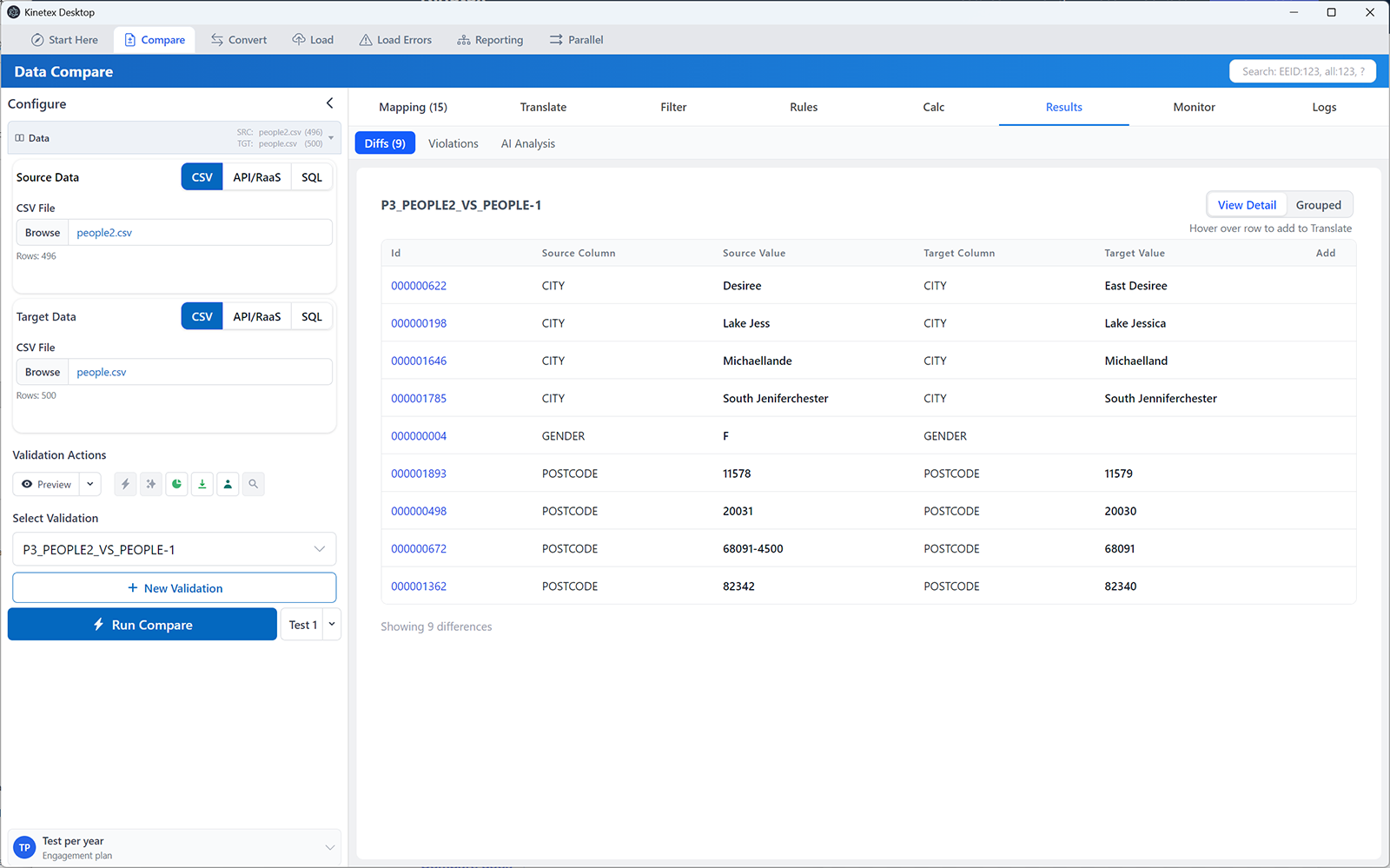
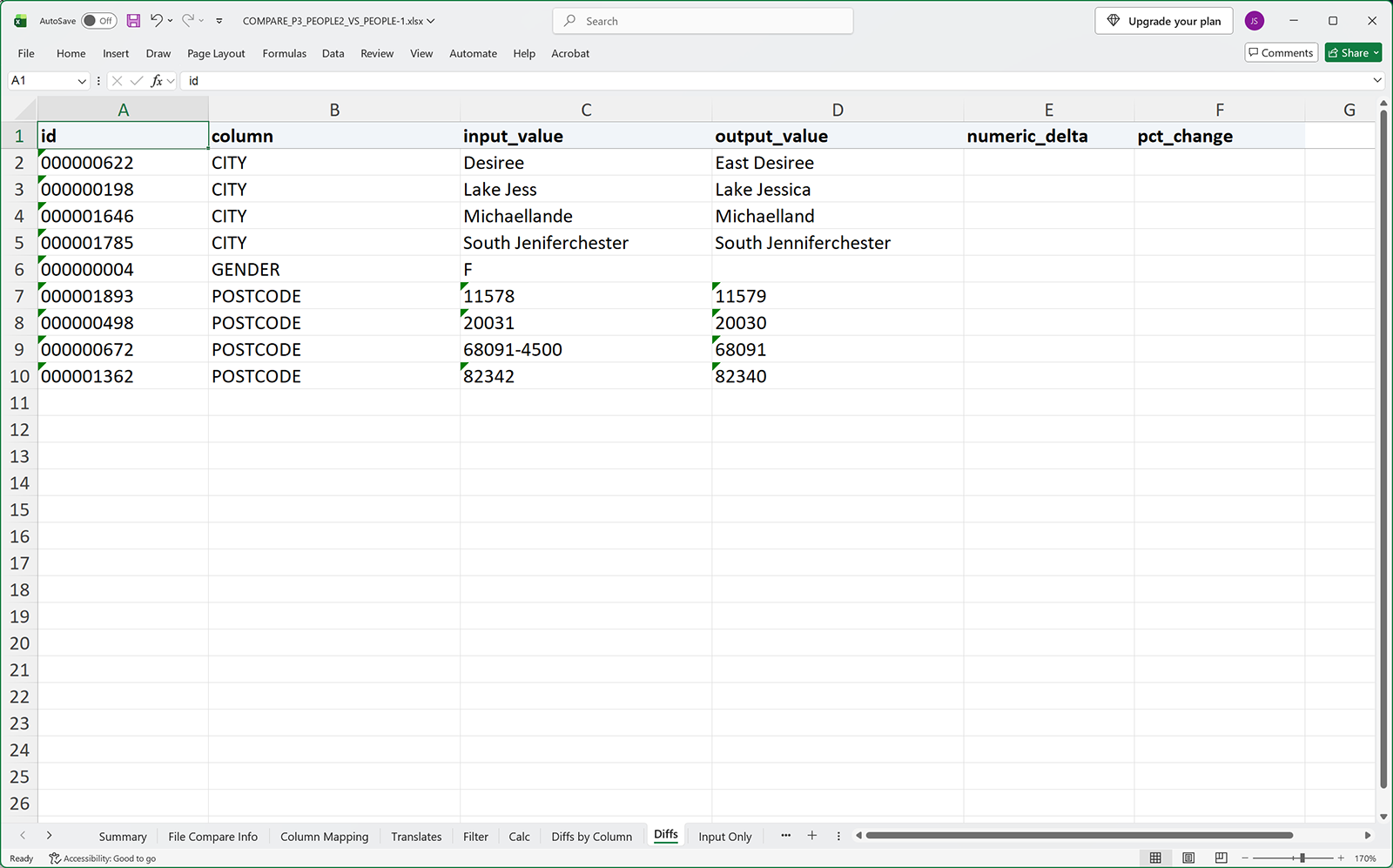
Every difference on one grid: key, column, source value, target value. Filter it, sort it, and open the worker behind any row. Rows that exist on only one side are listed separately, so "missing" and "different" never blur together.
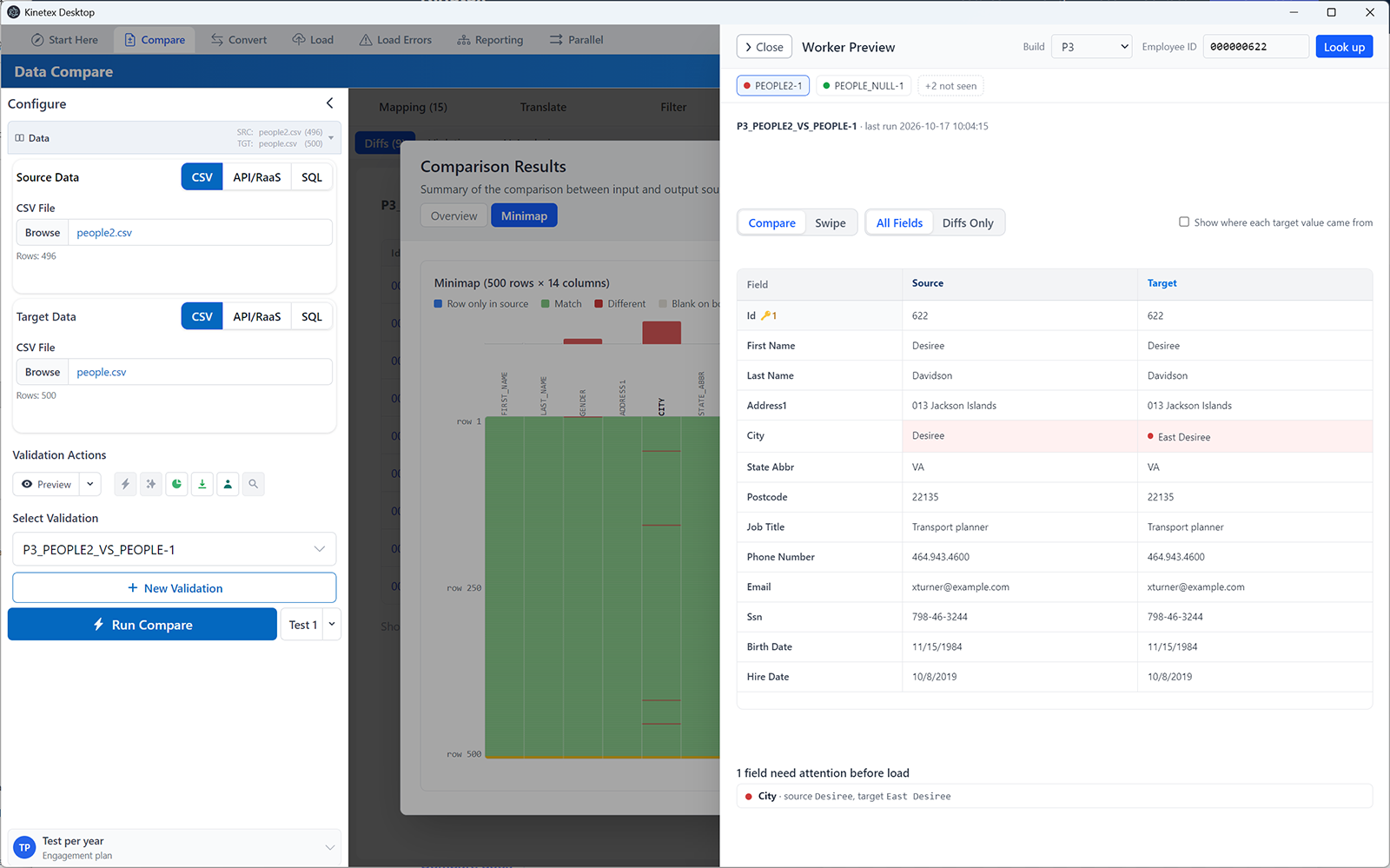
Pick any employee and see their legacy record and their converted record side by side, with the differing fields flagged. Drag the divider to wipe between the two. It is the view the business user asks for, and the one that ends the "is this a real difference?" conversation.
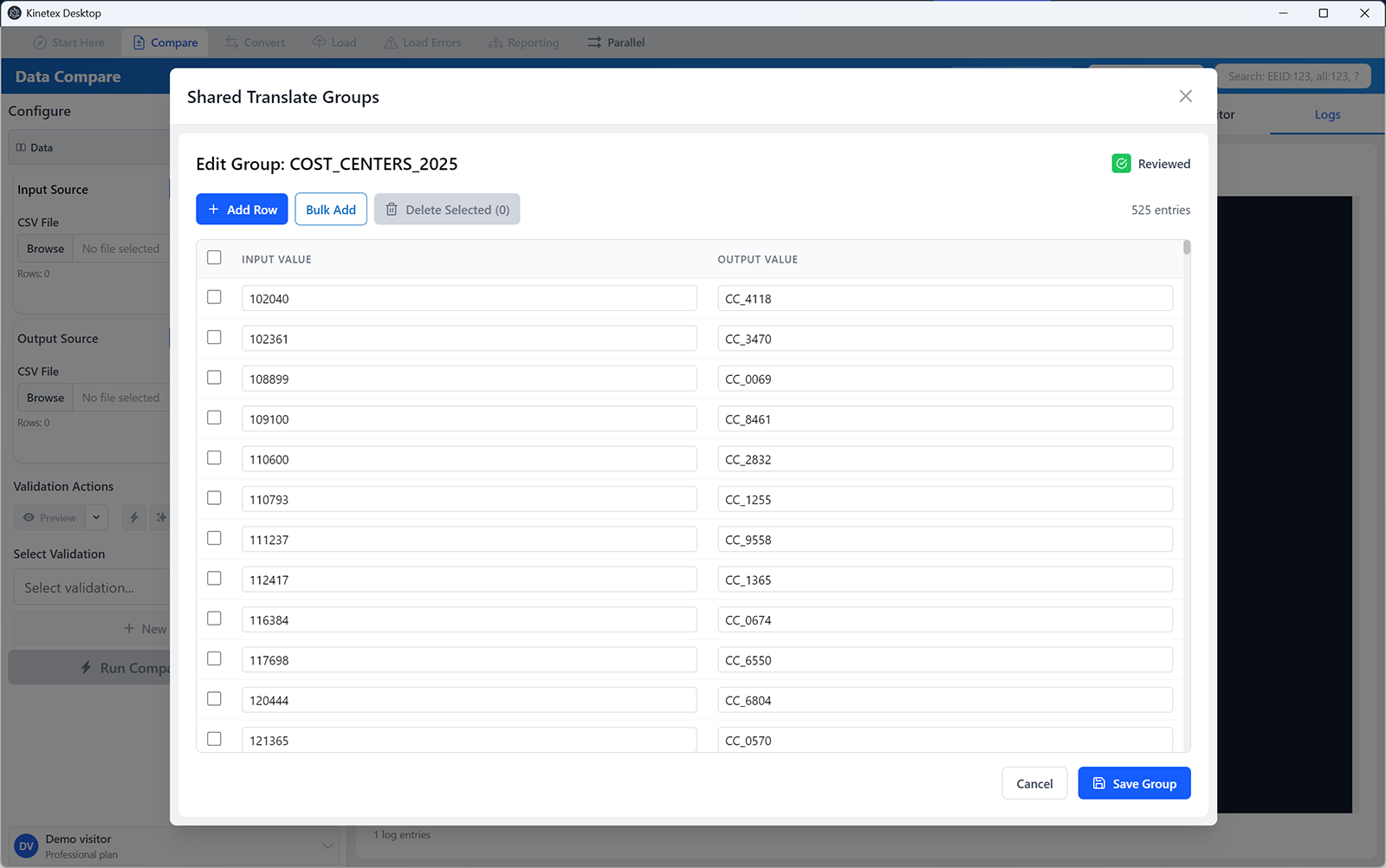
Build the crosswalk once as a translate group — M to Male, FT to Full_time, a cost-center number to its Ref ID — and every comparison, conversion and load that touches the column uses it. Fill Xlat proposes the pairs from the data itself and never overwrites one you typed.
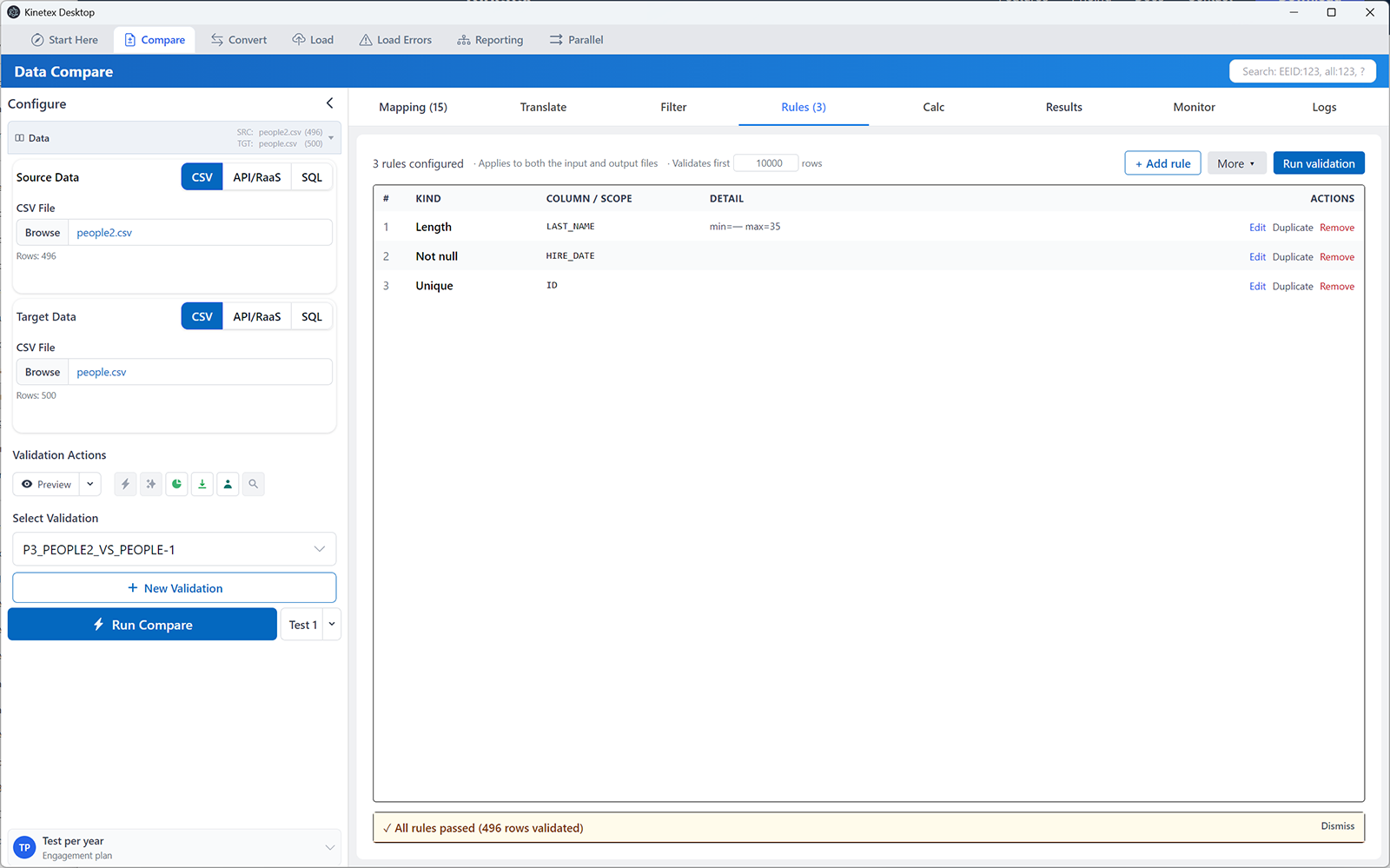
"Name under 35 characters." "Required fields can't be blank." "Value must be in this Reference Set." Rules run across the whole file and report every violation with its row, so the failure shows up on your desktop instead of in a Workday load report two hours later.
Every run writes an Excel workbook: the summary, the differences with both values, the rows found on one side only, and the configuration that produced them. It opens in Excel like any other spreadsheet, which is exactly what the business expects to receive.
Kinetex ships its own MCP server, so Claude Code, Claude Desktop or Codex can work the app for you. Ask in words; the agent opens or creates a validation, runs it, and reads back the result. Every mapping, key and run it proposes goes through the same checks as a click.
Runs beside your agent on your machine, no relay and no cloud hop. The agent sees what the app shows it, under the same privacy setting as the AI features. Desktop app, Pro plan.
Column mapping suggestions and difference analysis, with four privacy modes: redact, pseudonymize, synthetic, or send raw. Before anything is sent, a preview shows the exact payload, value by value, and lists any column that would go unchanged. Use the hosted AI, your own provider, or a model running on your own hardware.
AI & privacy guide →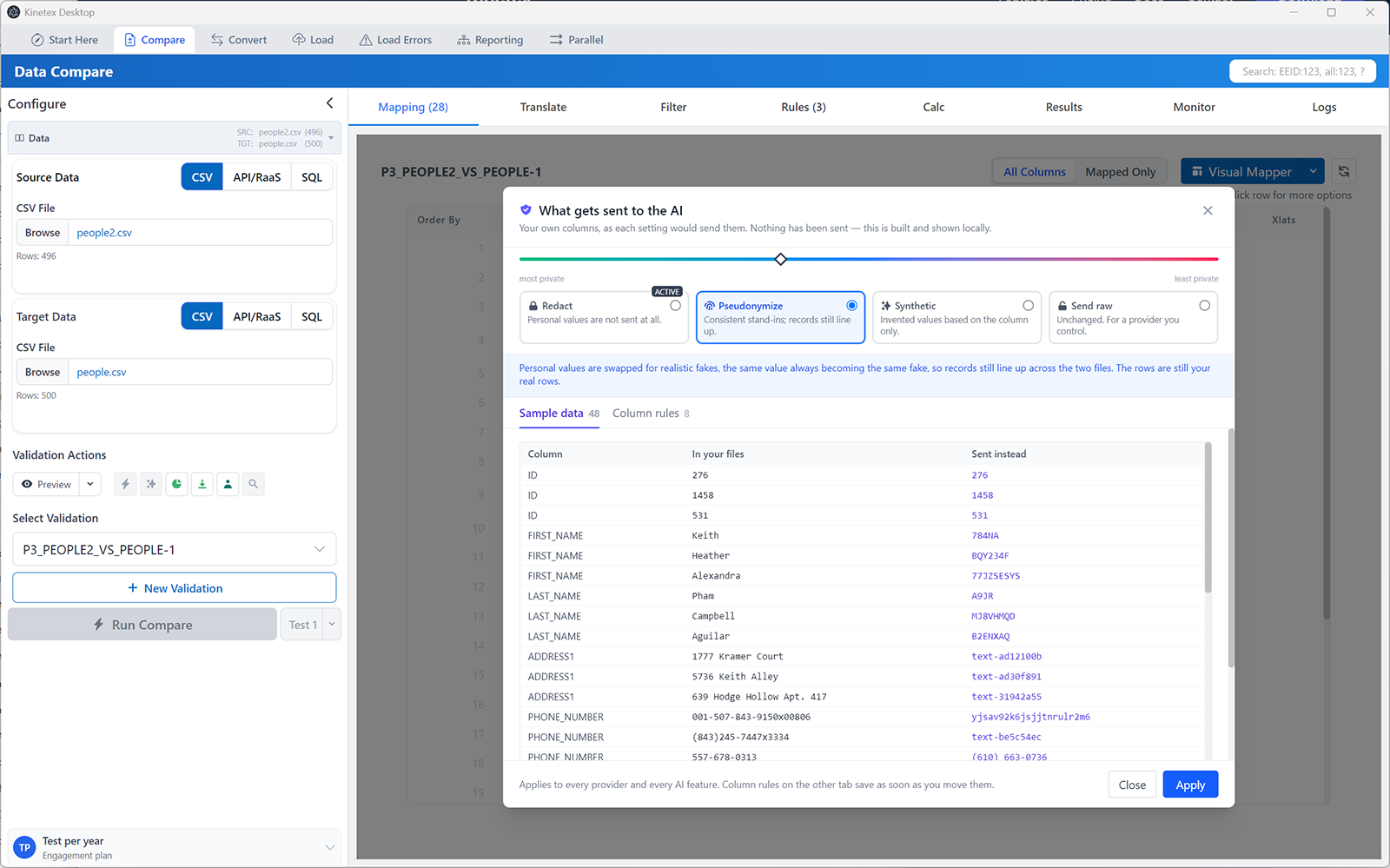
Join, find & replace, zero-pad, substring or split columns, with a live before/after preview on real rows. The result maps, translates and keys like any column.
Compare only the active workers, one pay group, or one batch, added straight from the Mapping grid.
Pick the worksheet and the first data row, so a DGW with documentation rows under the header compares without a CSV export. Password-protected workbooks open in the app.
Candidate keys ranked by real combined uniqueness, with what each pairs with on the other side and how many rows that was measured over.
Every run kept, with its counts, its report and the configuration that produced it. Reload any of them.
Unchanged files aren't re-read. The data engine stays warm, so a preview that once took 22 seconds takes about 2.
Compare is the heart of it. The same mappings and translate groups carry into the rest of the conversion.
Legacy files into Workday partner formats and Data Gathering Workbooks, with the same mappings, Ref ID translations and pre-flight rules.
Convert docs →Populate inbound EIB templates for mass loads on a live tenant, section by section, with rules checked before you upload.
EIB docs →Drop in a Workday failure report and every error maps back to the exact row, column and value in your workbook.
Load Errors docs →Join two sources — files, Workday reports or SQL — into one output, locally.
Reporting docs →Fast, private, and dependable when go-live is 48 hours away.
Data is processed on your CPU and stays on your disk. No upload, no relay, no account wall to run a comparison. Client files never leave the laptop they were extracted to, so the NDA conversation is a short one.
Dozens of columns and hundreds of thousands of rows on an ordinary consultant laptop. Minimap and Test run were built against a 450,000-row workbook, the kind that locks Excel up mid-scroll.
An embedded Model Context Protocol server. Drive validations, inspect mappings and query diffs from Claude Code or a local agent, under the same privacy modes.
Code-signed by Kinetex Consulting Services, Inc. Installs as an MSIX package and picks up new builds on its own.
Email reaches the person who wrote it, and who still runs it on live Workday projects. What the next build cycle needs usually ships before it.
Download it, open the two files from your last build cycle, and have the differences on screen before the coffee is ready.
14-day full trial · Local-only processing · Enterprise licensing available